


Overview (06/28/2026)
The first dual arm solution started on ROS1 Melodic (Ubuntu18.04) since 2017, has fallen far behind current mainstream platforms. It is more and more difficult to find compatible libraries and their dependencies, compatible version Python, even rebuilding from the source . The biggest hurdle is integrating the latest TensorFlow 2.x for modern machine learning framework.
The current popular Linux platform is Ubuntu 24.04 (Noble Numbat- supported until May 2029), and the recommended and natively supported ROS on it is ROS2 Jazzy Jalisco. Instead of updating new ROS node on the older platform, I began porting all current solution to ROS2 platform and shifting all new work on the new platform:
New Development Platform:
- Ubuntu 24.04 OS on Latitude 5480 (Host development PC).
- Install ROS2 Jazzy full version.
- VS code IDE (Docker container for ROS2 Jazzy for isolated, native-feeling development environment.
- Once one robot arm software framework is good shape, develop Ubunu24.04 OS image and install, ROS2 Jazzy and TensorFlow Lite on Raspberry PI 4B.
Porting to ROS2
Migrating from ROS1 to ROS2 is a major architecture shift, not only limited on updating all ROS1 nodes to ROS2 node: Core Architecture Components accomplished:
- ROS2 Hardware Interface (
SystemInterface):Support new Ros2_control, including add ros2_control tab in Hexbot URDF file so as to launch Hex7botHarware interface:
<!--  You can define multiple hardware components (System, Actuator, or Sensor) by repeating the
    <ros2_control> tag within your URDF. Each tag must have a unique name -->
<ros2_control name="Hex7botHardware" type="system">
  <hardware>
    <plugin>rbt_controllers/Hex7botRos2Interface</plugin>
    <!-- Add parameters specific to your interface here -->
    <param name="enforce_limits">true</param>
    <param name="gripper_control">true</param>
  </hardware>
  <joint name="joint1">
    <!-- Hardware exposes the command interface here -->
    <command_interface name="position">
      <param name="min">-3.14159</param>
      <param name="max">2.96706</param>
      <param name="ang_Offset">0.0</param>
    </command_interface>
    <state_interface name="position"/>
    <state_interface name="velocity"/>
  </joint>
   <joint name="joint2">
    <command_interface name="position">
      <param name="min">-1.9199</param>
      <param name="max">1.7453</param>
      <param name="ang_Offset">1.57080</param>
    </command_interface>
    <state_interface name="position"/>
    <state_interface name="velocity"/>
  </joint>
   <joint name="joint3">
    <command_interface name="position">
      <param name="min">-1.13446</param>
      <param name="max">1.04720</param>
      <param name="ang_Offset">-0.209</param>
    </command_interface>
    <state_interface name="position"/>
    <state_interface name="velocity"/>
  </joint>
   <joint name="joint4">
    <command_interface name="position">
      <param name="min">-3.49066</param>
      <param name="max">3.49066</param>
      <param name="ang_Offset">0.0</param>
    </command_interface>
    <state_interface name="position"/>
    <state_interface name="velocity"/>
  </joint>
    <joint name="joint5">
    <command_interface name="position">
      <param name="min">-2.09440</param>
      <param name="max">2.09440</param>
      <param name="ang_Offset">0.0</param>
    </command_interface>
    <state_interface name="position"/>
    <state_interface name="velocity"/>
  </joint>
  <joint name="joint6">
    <command_interface name="position">
      <param name="min">-6.98132</param>
      <param name="max">6.98132</param>
      <param name="ang_Offset">0.0</param>
    </command_interface>
    <state_interface name="position"/>
    <state_interface name="velocity"/>
  </joint>
  <!-- Gripper Joints -->
   <joint name="gripper">
   <command_interface name="position">
     <param name="min">0</param>
     <param name="max">50</param>
     <param name="ang_Offset">25.0</param>
   </command_interface>
   <state_interface name="position"/>
   <state_interface name="velocity"/>
 </joint>
</ros2_control>
- Updated all launch files from ROS1 xml format to ROS2 python format: such as: hexbot_joy_jog_control.py
import os
from ament_index_python.packages import get_package_share_directory
from launch.event_handlers import OnProcessExit, OnProcessStart
from launch import LaunchDescription
from launch.actions import ExecuteProcess,  RegisterEventHandler, Shutdown
from launch.actions import GroupAction
from launch.actions import DeclareLaunchArgument, LogInfo
from launch.conditions import IfCondition
from launch_ros.actions import Node, PushRosNamespace
from launch_ros.substitutions import FindPackageShare
from launch.substitutions import LaunchConfiguration
from launch.substitutions import PathJoinSubstitution
import xacro

"""
    Robot arm jogging control over joysticks.
"""
def generate_launch_description():
    robot_namespace ="hex7bot"
    # Define a LaunchConfiguration to track the value
    enable_gripper_config = LaunchConfiguration('enable_gripper_controller')
    # Declare the argument with a name default value and description
    enable_gripper_controller_arg = DeclareLaunchArgument(
        'enable_gripper_controller',
        default_value='true',
        description='Flag to enable or skip gripper controller'
    )
    # Find the share directory of your robot description package
    rbt_description_name = 'rbt_descriptions' # Replace with your package name
    description_share_directory = get_package_share_directory(rbt_description_name)

    # Define the path to your xacro file
    xacro_file_path = os.path.join(description_share_directory, 'urdf', 'hex7bot.urdf.xacro')

    # Process the xacro file (this automatically resolves all <xacro:include> tags)
    robot_description_raw = xacro.process_file(xacro_file_path).toxml()

    # Use the `Command` substitution to execute xacro and get the URDF string
    robot_description = {'robot_description' : robot_description_raw}
    # Path to the YAML configuration file for controllers
    controller_folder = "rbt_controllers"
    controller_config = os.path.join(get_package_share_directory(controller_folder),
        'config',
        'hex7bot/hex7bot_controllers.yaml'
    )

    # Create the robot_state_publisher node
    robot_state_publisher_node = Node(
        package='robot_state_publisher',
        executable='robot_state_publisher',
        output='screen',
        namespace=robot_namespace,
        parameters=[robot_description]
    )
    # motion servo node to process keyboard commands for velocity and low pass filter
    motion_servo_config = os.path.join(
        get_package_share_directory('motion_servo'),
        'config',
        'hex7bot_servo_config.yaml'

    )
    motion_servo_node = Node (
        package='motion_servo',
        executable='servo_server',
        name='motion_servo', # Must match the name used in your YAML file
        parameters=[motion_servo_config, robot_description],
        output='screen'
    )


    # Main control manager node
    # To launch the controller_manager in ROS2 using a Python launch file, you need to
    # define a ros2_control_node that loads your robot's URDF and a YAML configuration file
    # for the controllers.
    controller_manager_node = Node(
        package="controller_manager",
        executable="ros2_control_node",
        namespace=robot_namespace,
        parameters=[robot_description, controller_config],
        output="screen", # or output="screen"
     )

    # Spawner for the joint_state_broadcaster
    joint_state_broadcaster_spawner = Node(
        package='controller_manager',
        executable='spawner',
        namespace =robot_namespace,
        arguments=['joint_state_broadcaster', '--controller-manager',
            f'/{robot_namespace}/controller_manager'],
        output='screen',
    )

    # Spawner for the arm controller (joint_group_controller)
    arm_controller_spawner = Node(
        package='controller_manager',
        executable='spawner',
        namespace=robot_namespace,
        arguments=['forward_position_controller', '--controller-manager',
             f'/{robot_namespace}/controller_manager'],
        output='screen',
    )
      # Spawner for the gripper controller
    gripper_controller_spawner = Node(
        package='controller_manager',
        executable='spawner',
        namespace=robot_namespace,
        arguments=['gripper_action_controller', '--controller-manager',
            f'/{robot_namespace}/controller_manager', "--controller-manager-timeout", "30"],
        output='screen',
        condition=IfCondition(enable_gripper_config)
    )

    # 6. Create joy stick driver node
    jog_publisher_node = Node(
        package='joy_linux',
        executable='joy_linux_node',
        output='screen',
    )

    teleop_params = {
      'DOF' : 6,
      'linear_scale' : 0.01,
      'angular_scale' : 0.01,
      'joint_scale' : 2.0,
      'gripper_button' : 0, # button 1 trigger button
      'linear_enable_button' : 1, # button 1 main lower buttion
      'angular_x_button' : 2, # button 3
      'angular_y_button' : 3, # button 4
      'angular_z_button' : 4, # button 5
      'joint1_button' : 5, # button 6
      'joint1_axis' : 0, # first axis and button 6 combination
      'joint2_button' : 6, # button 7
      'joint2_axis' : 0,  # still use first axis
      'joint3_button' : 7, # button 8
      'joint3_axis' : 0, # first axis
      'joint4_button' : 8, # button 9
      'joint4_axis' : 0, # first axis
      'joint5_button' : 9, # button 10
      'joint5_axis' : 0, #first axis
      'joint6_button' : 10, #button 11
      'joint6_axis' : 0, # first axis
      'jog_duration' : 0.1,
      'delta_twist_cmds' : 'motion_servo/delta_twist_cmds',
      'delta_joint_cmds' : 'motion_servo/delta_joint_cmds',
      'robot_link_command_frame' : 'world',
      'ee_frame_name' : 'ee_link',
      'planning_frame' : 'world',
      'hand_action_topic' : 'gripper_action_controller/gripper_cmd'
    }

    # jogstick_input_node
    joystick_jog_node = Node(
        package='teleop',
        executable='joystick_jog',
        output='screen',
        parameters=[teleop_params,robot_description] # Pass the parameter
    )

    """
    This function defines the launch description for the system.
    """
    return LaunchDescription([
        enable_gripper_controller_arg,
        robot_state_publisher_node,
        controller_manager_node,
        RegisterEventHandler(
            event_handler=OnProcessStart(
                target_action=robot_state_publisher_node,
                on_start=[joint_state_broadcaster_spawner],
            )
        ),
        arm_controller_spawner,
        gripper_controller_spawner,
        # Group actions to isolate namespaces
        GroupAction(
            actions=[
                # 1. Push all nodes and topics into the namespace
                PushRosNamespace(namespace=robot_namespace),
                jog_publisher_node,
                joystick_jog_node,
                motion_servo_node,
                ] # end of action
        ), # end of groupaction
       # rviz2_node
    ])
- Integrate popular robot arm controllers into the project including:
joint_trajectory_controllerforward_command_controller- gripper_action_controller
- joint_state_broadcaster
Note: all controllers’ source code is local source controlled to facilitate code maintenance and debugging with gdb debugger.
ROS2 style Controller configuration file (yaml file):
hex7bot:
  controller_manager:
    ros__parameters:
      update_rate: 25 # Hz
      overruns:
        manage: false # Disable overrun detection/logging

      # Define the controllers you want to load
      joint_state_broadcaster:
        type: rbt_controllers/JointStateBroadcaster

      joint_group_controllers:
        type: rbt_controllers/JointGroupPositionController # Name from xml

      #forward_position_controller: (ROS2 )
      forward_position_controller:
        type: rbt_controllers/ForwardCommandController

      gripper_action_controller:
        type: rbt_controllers/GripperActionController

      # Joint trajactory controller
      joint_trajectory_controller:
        type: rbt_controllers/joint_trajectory_controller

  joint_state_broadcaster:
    ros__parameters:
      # Explicitly leaving this list empty or omitting it tells the broadcaster
      # to publish all available interfaces (such as position and velocity) for your joints.
      use_local_parameter_namespace: true
      joints:
        - joint1
        - joint2
        - joint3
        - joint4
        - joint5
        - joint6
        - gripper
      interfaces:
        - position
        - velocity
      use_local_topics: false
      map_interface_to_joint_state:
        position: position
        velocity: velocity
      # extra_joints:
      #  - upper_arm_to_ellbow_virtual

  joint_group_controllers:
    ros__parameters:
      joints:
        - joint1
        - joint2
        - joint3
        - joint4
        - joint5
        - joint6
      command_interfaces:
         - position
      state_interfaces:
        - position
        - velocity

  forward_position_controller:
    ros__parameters:
      joints:
        - joint1
        - joint2
        - joint3
        - joint4
        - joint5
        - joint6
      command_interfaces:
        - position
      state_interfaces:
        - position
        - velocity
      # Critial for chainable controllers(like PID or Twist)
      is chainable: false

  gripper_action_controller:
    ros__parameters:
      joint: gripper ## Name of your grippers's joint
      command_interfaces:
        - position
      state_interfaces:
        - position
        - velocity
      is chainable: false

  joint_trajectory_controller:
    ros__parameters:
      joints:
        - joint1
        - joint2
        - joint3
        - joint4
        - joint5
        - joint6

      command_interfaces:
        - position

      state_interfaces:
        - position
        - velocity
- ROS2 Controller Manager: Re-organize and optimize software architecture , such as joystick control application.
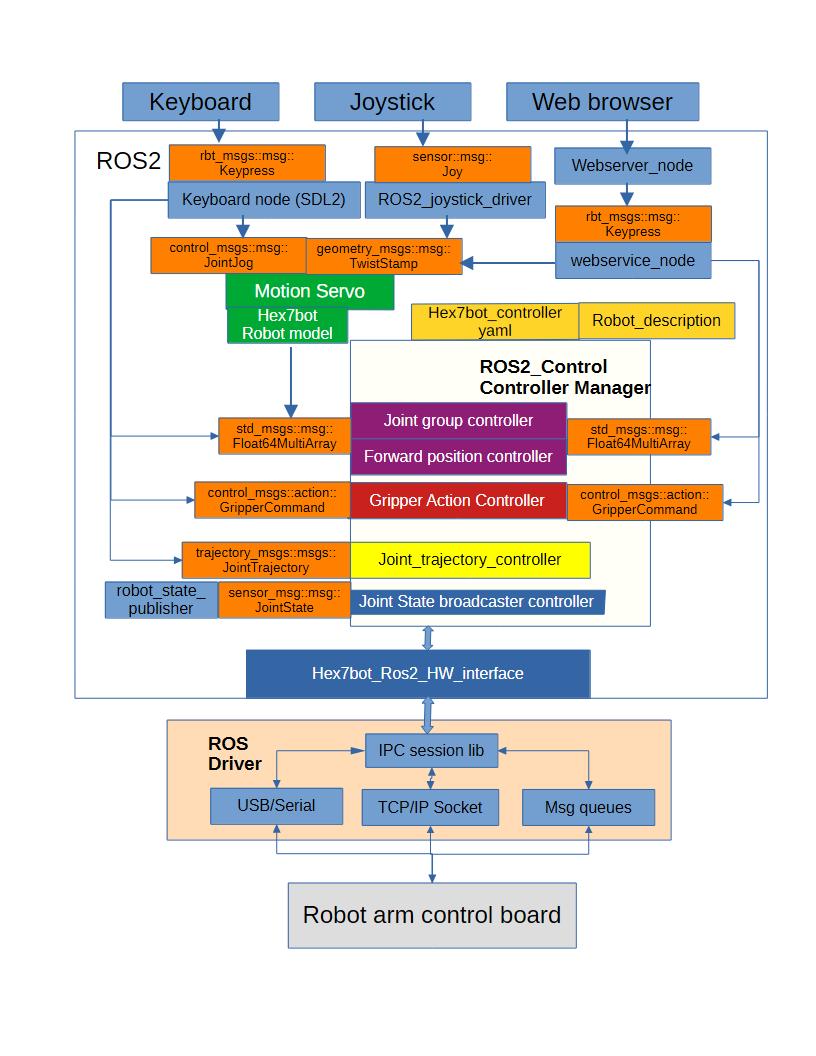
Graphical visualization of all running nodes that communicates with one another with rqt_graph.

3D Vision Integration and Perception Processing (07/16/2026)
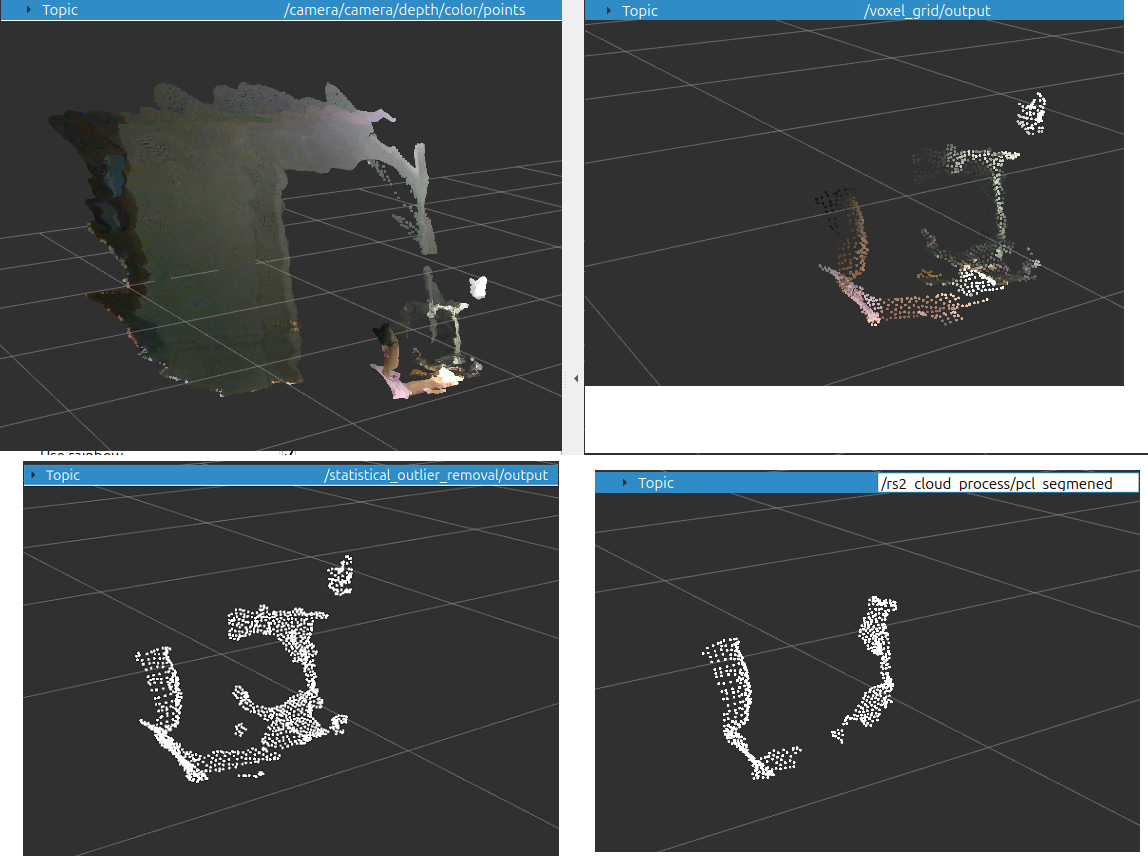
In ROS 2, RealSense Camera interfacing and perception pipeline are also involving rapidly and get much more modular and distributed compared to ROS1 described in the book chapter 12: 3D vision (PDF):
- ROS2 Jazzy distribution for librealsense2 is broken (can not install ), but can integrate into your workspace over source code (http://github.com/realsenseai/librealsense.git), e.g. stable branch: v2.56.4 branch. .
- PCL node for ROS2 only contains basic depth processing ( e.g. with the command ros2 component types pcl_ros):
- pcl_ros::ExtractIndices
- pcl_ros::PassThrough
- pcl_ros::ProjectInliers
- pcl_ros::RadiusOutlierRemoval
- pcl_ros::StatisticalOutlierRemoval
- pcl_ros::CropBox
- pcl_ros::VoxelGrid
- pcl_ros::PCDPublisher
- pcl_ros::PointCloudToPCD
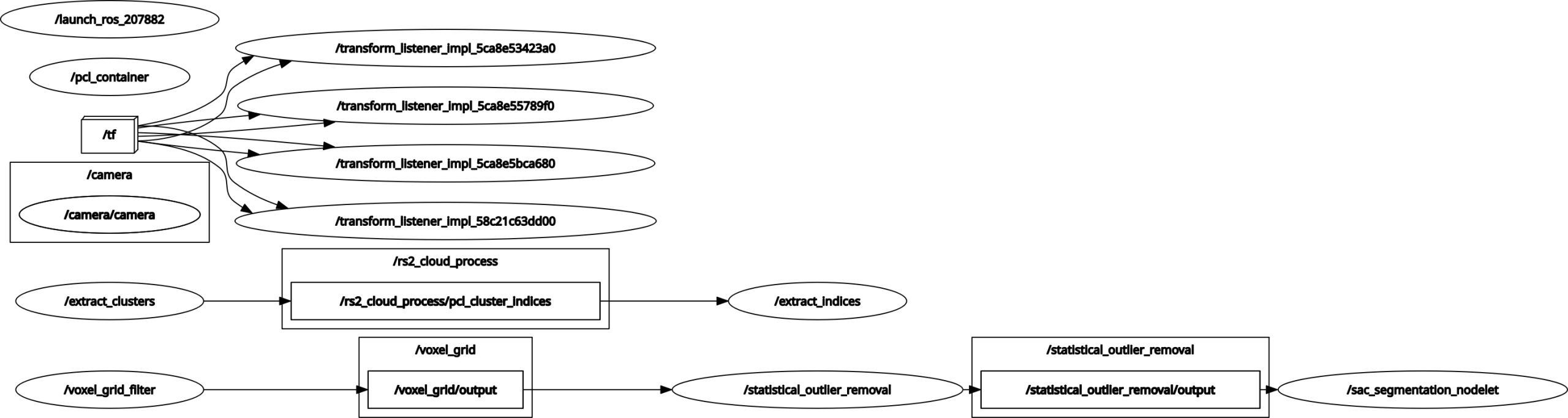
- To all PCL processing nodes in ROS1 not included in ROS2, we can port them from ROS1 to ROS2 easily ( thanks for AI search engine and we can find these sample code easily).
- One sample:
import os
from ament_index_python.packages import get_package_share_directory
from launch import LaunchDescription
from launch.actions import DeclareLaunchArgument, IncludeLaunchDescription
from launch.launch_description_sources import PythonLaunchDescriptionSource
from launch.substitutions import LaunchConfiguration
from launch_ros.actions import Node, ComposableNodeContainer
from launch_ros.descriptions import ComposableNode
from launch.substitutions import PathJoinSubstitution
from launch.conditions import IfCondition
from launch_ros.actions import LoadComposableNodes

def generate_launch_description():
    # -------------------------------------------------------------------------
    # 1. Declare Launch Arguments
    # -------------------------------------------------------------------------
    gui_arg = DeclareLaunchArgument(
        'gui',
        default_value='true',
        description='Flag to enable/disable GUI components'
    )

    cloud_topic_arg = DeclareLaunchArgument(
        'cloud_topic',
        default_value='/camera/depth/color/points',
        description='Input point cloud topic name'
    )

    manager_arg = DeclareLaunchArgument(
        'manager',
        default_value='pcl_container',
        description='Name of the component manager container'
    )

    # Use LaunchConfiguration to grab the runtime values of the arguments
    gui = LaunchConfiguration('gui')
    manager_name = LaunchConfiguration('manager')

    # camera shared directory
    camera_dir = get_package_share_directory('realsense2_camera')
    camera_launch_file = PathJoinSubstitution([
        camera_dir,
        'launch',
        'rs_launch.py'
    ])
    # Include camera launch file
    camera_launch_include=IncludeLaunchDescription(
        PythonLaunchDescriptionSource(camera_launch_file),
        # Optional: Pass arguments to the included launch file if needed
        launch_arguments={'pointcloud.enable': 'true'}.items()
    )
    # -------------------------------------------------------------------------
    # 2. Include External Voxel Grid Launch File
    # -------------------------------------------------------------------------
    # Finds the ROS 2 package share directory instead of $(find ...)
    voxel_grid_launch_dir = os.path.join(
        get_package_share_directory('rbt_percept_process'),
        'launch',
        'filters',
        'rs2_voxel_grid_launch.py'  # Converted to .launch.py in ROS 2
    )
    voxel_grid_include = IncludeLaunchDescription(
        PythonLaunchDescriptionSource(voxel_grid_launch_dir),
        launch_arguments={
            'leaf_size': '0.1'
        }.items()
    )

    # -------------------------------------------------------------------------
    # 3. Create Component Container (Equivalent to Nodelet Manager)
    # -------------------------------------------------------------------------
    pcl_container = ComposableNodeContainer(
        name=manager_name,
        namespace='',
        package='rclcpp_components',
        executable='component_container',
        output='screen',
    )

    # Define the PCL Statistical Outlier Removal Node
    #   Apply pcl::StatiscalOutlierRemoval to eliminate noisy and stray point
    pcl_outlier_removal_node =  ComposableNode(
        package='pcl_ros',
        plugin='pcl_ros::StatisticalOutlierRemoval',
        name='statistical_outlier_removal',
        parameters=[{
            'mean_k': 10,
            'stddev': 1.0
        }],
        remappings=[
            ('input', '/voxel_grid/output'),
            ('output', 'statistical_outlier_removal/output')
        ]
    )
    # Define the PCL SAC Segmentation Composable Node for planar segmentation
    pcl_sac_segment_node = ComposableNode(
        package='rbt_percept_process',
        plugin='pcl_ros::rs2CloudSegmentation',
        name='sac_segmentation_nodelet',
        parameters=[ {
         'model_type': "SACMODEL_PLANE", # "SACMODEL_PLANE", "SACMODEL_LINE", "SACMODEL_CIRCLE2D", "SACMODEL_SPHERE"
                                         # "SACMODEL_CYLINDER", "SACMODEL_CONE", "SACMODEL_TORUS"
         'method_type': "SAC_RANSAC", # SAC_RANSAC(Random Sample Consensus); SAC_LMEDS (least Median of Squares).
                                      # SAC_MSAC(M-Estimator Sample conseensus); SAC_RRANSAC( Randomized RANSAC)
                                      # SAC_RMSAC(Randomized MSAC); SAC_MLESAC(Maximum Likelihood Estimation Sample Consensus).
                                      # SAC_PROSAC(Progressive Sample Consensus).
         'distance_threshold': 0.05, # Adjust as needed
         'max_iterations':1000,
         'optimize_coefficients': True
         }],
        remappings=[
            ('input', 'statistical_outlier_removal/output'),
            ('output/model', '/rs2_cloud_process/pcl_segmented_modecoeffient'),
            ('output/inliers', '/rs2_cloud_process/pcl_segmented_inliers'), # Fixed broken string from XML
            ('output/pcl_segmented', '/rs2_cloud_process/pcl_segmened')
        ]
    )

    # Define the PCL Euclidean Cluster Extraction ComposableNode
    # Segmentation: Euclidean Cluster Extraction
    pcl_euclidean_cluster_node = ComposableNode(
        package='rbt_percept_process',
        plugin='pcl_ros::EuclideanClusterNode',
        name='extract_clusters',
        parameters=[{
            'cluster_tolerance': 0.03,
            'spatial_locator': 1,
            'max_cluster_size': 25000,
            'min_cluster_size': 100,
            }],
        remappings=[
            ('input', '/rs2_cloud_process/pcl_segmented_inliers'),
            ('output', '/rs2_cloud_process/pcl_cluster_indices')
             ]
    )

    # Define the PCL Extract Indices node
    pcl_extract_indice_node =  ComposableNode(
        package='pcl_ros',
        plugin='pcl_ros::ExtractIndices',
        name='extract_indices',
        remappings=[
            ('input', '/rs2_cloud_process/pcl_cluster_indices'),
            ('output', '/rs2_cloud_process/pcl_extracted_segment_cloud')
        ],
        parameters=[{
            'approximate_sync': True
        }]
    )

    # Last : define the RViz node with a conditional IfCondition
    rviz_node = Node(
        package='rviz2',
        executable='rviz2',
        name='rviz',
        output='screen',
        condition=IfCondition(gui)
    )
    # -------------------------------------------------------------------------
    #  Return Launch Description
    # -------------------------------------------------------------------------
    return LaunchDescription([
        gui_arg,
        cloud_topic_arg,
        manager_arg,
        camera_launch_include,
        pcl_container,
        voxel_grid_include,
        LoadComposableNodes(
            target_container=manager_name,
            composable_node_descriptions=[
                    pcl_outlier_removal_node,
                    pcl_sac_segment_node,
                    pcl_euclidean_cluster_node,
                    pcl_extract_indice_node
        ]),
        rviz_node
    ])
Machine learning/Deep Learning Platform:
- Install Tensorflow 2.17 and port ROS2 deep learning nodes. Lesson learned from ROS1 that the latest TensorFlow that can support ROS1 (Ubuntu 18.04 ROS melodic, Python 3.6) without Docker was version 1.5, the trained model ( TensorFlow graph ) self-contained Protocol buffer(.pb) file only containes network structure but not weights, extra work had to be done to process the input/weghts prior to calling the session for inference. Please refer to Chap 14: Deep Learning of the book.
Very often you will find it is not an easy job to install latest Tensorflow 2.x package directly on Ubuntu 24.04 , especially, when your PC has Nvidia GPUs. The cleanest method is to download stable Tensorflow source code (e.g. v2.17) , build and install libtensorflow_cc and libtensorflow_framework with matched Bazel tool ,although you will run into many obstacles, e.g. Nvidia Drivers, Cuda version and supported GPU architectures, not found reference or symbols, eventually you will get a environment for off-line model training ( Python virtual environment ) and inference(Loading and Predicting) for ROS2.
- Deep learning process : deep learning model and code from ROS1 can be reused as they are developed by Python and can directly run without compiling. However, the deep learning C/C++ interfaces to ROS2 must be upgraded: such as a ROS2 inverse kinematics Inference node:
#include <memory>
#include <vector>
#include "rclcpp/rclcpp.hpp"
#include "geometry_msgs/msg/pose.hpp"
#include <sensor_msgs/msg/joint_state.hpp>
#include "std_msgs/msg/float32_multi_array.hpp"

// Include full TensorFlow C++ API headers
#include "tensorflow/core/public/session.h"
#include "tensorflow/core/protobuf/config.pb.h"

//Constants
#define NODE "ik_tf_inference_node"
#define VERSION "0.1"
#define MODIFIED "07-25-2026"

class IKInferenceNode : public rclcpp::Node {
public:
    IKInferenceNode() : Node(NODE) {
        //Initalize TensorFlow Session
        tensorflow::SessionOptions options;
        tensorflow::Status status = tensorflow::NewSession(options, &session_);
        if (!status.ok()) {
            RCLCPP_ERROR(this->get_logger(), "Could not create TF session: %s", status.ToString().c_str());
            return;
        }

        this->declare_parameter<std::string>("robot_arm_name", "");
        robot_arm_name_ = this->get_parameter("robot_arm_name").as_string();
        if(robot_arm_name_.empty())
        {
           RCLCPP_ERROR(this->get_logger(), "Failed to read robot arm name: %s", status.ToString().c_str());
            return;
        }

        // Load SavedModel bundle / graph definition
        std::string model_dir = "~/project/tensorflow/src_py/model/" + robot_arm_name_ ;

        status = tensorflow::ReadBinaryProto(tensorflow::Env::Default(), model_dir + "/ik_graph.pb", &graph_def_);
        if (!status.ok()) {
            RCLCPP_ERROR(this->get_logger(), "Failed to read graph proto: %s", status.ToString().c_str());
            return;
        }

        status = session_->Create(graph_def_);
        if (!status.ok()) {
            RCLCPP_ERROR(this->get_logger(), "Failed to create graph in session: %s", status.ToString().c_str());
            return;
        }

        // Setup ROS 2 Subscriber and Publisher
        pose_sub_ = this->create_subscription<geometry_msgs::msg::Pose>(
            "target_pose", 10, std::bind(&IKInferenceNode::poseCallback, this, std::placeholders::_1));

       // Initialize publisher for joint states
       joint_pub_ = this->create_publisher<sensor_msgs::msg::JointState>("joint_states", 10);
    }

private:
    void poseCallback(const geometry_msgs::msg::Pose::SharedPtr msg) {
        // Prepare input tensor: [x, y, z, qx, qy, qz, qw] (7 elements for 6-DOF pose target)
        tensorflow::Tensor input_tensor(tensorflow::DT_FLOAT, tensorflow::TensorShape({1, 7}));
        auto mapped_input = input_tensor.tensor<float, 2>();
        mapped_input(0, 0) = msg->position.x;
        mapped_input(0, 1) = msg->position.y;
        mapped_input(0, 2) = msg->position.z;
        mapped_input(0, 3) = msg->orientation.x;
        mapped_input(0, 4) = msg->orientation.y;
        mapped_input(0, 5) = msg->orientation.z;
        mapped_input(0, 6) = msg->orientation.w;

        std::vector<std::pair<std::string, tensorflow::Tensor>> inputs = {
            {"serving_default_input_1", input_tensor} // Adjust input operation name matching your model
        };
        std::vector<std::string> output_names = {"StatefulPartitionedCall"}; // Adjust output operation name

        std::vector<tensorflow::Tensor> outputs;
        tensorflow::Status status = session_->Run(inputs, output_names, {}, &outputs);
        if (!status.ok()) {
            RCLCPP_ERROR(this->get_logger(), "Inference failed: %s", status.ToString().c_str());
            return;
        }

        // Extract 6 joint angles from output tensor
        auto mapped_output = outputs[0].tensor<float, 2>();
        sensor_msgs::msg::JointState joint_msg;
        joint_msg.header.stamp = this->get_clock()->now();
        joint_msg.name = {"joint1", "joint2", "joint3", "joint4", "joint5", "joint6"};
        joint_msg.position = {
            mapped_output(0, 0), mapped_output(0, 1), mapped_output(0, 2),
            mapped_output(0, 3), mapped_output(0, 4), mapped_output(0, 5)
        };

        joint_pub_->publish(joint_msg);
    }

    std::string robot_arm_name_;
    tensorflow::Session* session_ = nullptr;
    tensorflow::GraphDef graph_def_;
    rclcpp::Subscription<geometry_msgs::msg::Pose>::SharedPtr pose_sub_;
    rclcpp::Publisher<sensor_msgs::msg::JointState>::SharedPtr joint_pub_;

};

int main(int argc, char* argv[]) {
    rclcpp::init(argc, argv);

    std::shared_ptr<IKInferenceNode> node = std::make_shared<IKInferenceNode>();
    RCLCPP_INFO(node->get_logger(), "Version " VERSION " (" MODIFIED ")");
    RCLCPP_INFO(node->get_logger(), "Built " __DATE__ " at " __TIME__);
    RCLCPP_INFO(node->get_logger(), " ");

    rclcpp::spin(node);
    rclcpp::shutdown();
    return 0;
}
ROS2 Workspace for Raspberry PI 4b (08/16/2026)
- Develop Ubuntu 24.04/ROS2 Jazzy image for Raspberry PI: Install Ubuntu 24.04 server/ROS2 Jazzy full image on a 64GB microSD card.
- Build and install FlatBuffer 24.3.25 from source code
- Install Bazel 6.5.0 for TensorflowLite 2.17.0 ; Downloaded TensorFlow source code (switch to branch v2.17) and built Tensorflow Lite targets on Raspberry Pi 4b:
- C API Shared Library:libtensorflowlite_c.so
- C++ API Shared Library: libtensorflowlite.so
- Install Tensorflow Lite headers files: (
tensorflow/lite/core/c/ortensorflow/lite/)
- Develop Tensorflow Lite IK node for Raspberry PI 4b:
#include <memory>
#include <vector>
#include "rclcpp/rclcpp.hpp"
#include "geometry_msgs/msg/pose.hpp"
#include "std_msgs/msg/float32_multi_array.hpp"

#include "tensorflow/lite/interpreter.h"
#include "tensorflow/lite/kernels/register.h"
#include "tensorflow/lite/model.h"

class IKInferenceNode : public rclcpp::Node {
public:
    IKInferenceNode() : Node("ik_inference_node") {
        // Load TFLite model (ensure model.tflite is in your working directory or path)
        model_ = tflite::FlatBufferModel::BuildFromFile("ik_model_6dof.tflite");
        if (model_ == nullptr)
	{
	   RCLCPP_ERROR(this->get_logger(), "model_ = nullptr");
	}

        tflite::ops::builtin::BuiltinOpResolver resolver;
        tflite::InterpreterBuilder(*model_, resolver)(&interpreter_);

        if (interpreter_->AllocateTensors() != kTfLiteOk) {
            RCLCPP_ERROR(this->get_logger(), "Failed to allocate TFLite tensors!");
        }

        // Setup Subscriber for End-Effector Target Pose (X, Y, Z, Qx, Qy, Qz, Qw)
        pose_sub_ = this->create_subscription<geometry_msgs::msg::Pose>(
            "/target_pose", 10, std::bind(&IKInferenceNode::poseCallback, this, std::placeholders::_1));

        // Setup Publisher for 6 Joint Angles
        joint_pub_ = this->create_publisher<std_msgs::msg::Float32MultiArray>("/predicted_joints", 10);

        RCLCPP_INFO(this->get_logger(), "TFLite IK Inference Node initialized.");
    }

private:
    void poseCallback(const geometry_msgs::msg::Pose::SharedPtr msg) {
        float* input_tensor_ptr = interpreter_->typed_input_tensor<float>(0);

        // Populate input vector: X, Y, Z position and Orientation Quaternions
        input_tensor_ptr[0] = static_cast<float>(msg->position.x);
        input_tensor_ptr[1] = static_cast<float>(msg->position.y);
        input_tensor_ptr[2] = static_cast<float>(msg->position.z);
        input_tensor_ptr[3] = static_cast<float>(msg->orientation.x);
        input_tensor_ptr[4] = static_cast<float>(msg->orientation.y);
        input_tensor_ptr[5] = static_cast<float>(msg->orientation.z);
        input_tensor_ptr[6] = static_cast<float>(msg->orientation.w);

        // Run Inference
        if (interpreter_->Invoke() != kTfLiteOk) {
            RCLCPP_ERROR(this->get_logger(), "Inference failed.");
            return;
        }

        // Get Output Tensor (6 Joint Angles)
        float* output_tensor_ptr = interpreter_->typed_output_tensor<float>(0);
        auto joint_msg = std_msgs::msg::Float32MultiArray();
        joint_msg.data.assign(output_tensor_ptr, output_tensor_ptr + 6);

        joint_pub_->publish(joint_msg);
    }

    std::unique_ptr<tflite::FlatBufferModel> model_;
    std::unique_ptr<tflite::Interpreter> interpreter_;
    rclcpp::Subscription<geometry_msgs::msg::Pose>::SharedPtr pose_sub_;
    rclcpp::Publisher<std_msgs::msg::Float32MultiArray>::SharedPtr joint_pub_;
};

int main(int argc, char* argv[]) {
    rclcpp::init(argc, argv);
    rclcpp::spin(std::make_shared<IKInferenceNode>());
    rclcpp::shutdown();
    return 0;
}
set(TensorFlow_INCLUDE_DIR "/usr/local/include/tensorflow" CACHE PATH "TF include path")
set(TensorFlow_LIB_DIR "/usr/local/lib" CACHE PATH "TF lib path")

# Check for Raspberry ARM64 or X64/x86_64
if(CMAKE_SYSTEM_PROCESSOR MATCHES "x86_64|AMD64")
	add_executable(tf_ik_node src/tf_ik_inference_node.cpp)
	target_include_directories(tf_ik_node PRIVATE
	${TensorFlow_INCLUDE_DIR}
	${TensorFlow_INCLUDE_DIR}/src
	)
	ament_target_dependencies(tf_ik_node
		rclcpp geometry_msgs 	std_msgs sensor_msgs)
	find_library(TF_CC_LIB tensorflow_cc PATHS /usr/local/lib)
	find_library(TF_FRAMEWORK_LIB tensorflow_framework
	PATHS /	usr/local/lib)

	target_link_libraries(tf_ik_node
    		${TF_CC_LIB}
    		${TF_FRAMEWORK_LIB})
	install(TARGETS
	    tf_ik_node
	  DESTINATION lib/${PROJECT_NAME})

elseif(CMAKE_SYSTEM_PROCESSOR MATCHES "arm64|aarch64")
	add_executable(tflite_ik_node src/tflite_ik_inference_node.cpp)
	target_include_directories(tflite_ik_node PRIVATE
		${TensorFlow_INCLUDE_DIR}
		${TensorFlow_INCLUDE_DIR}/src)
	ament_target_dependencies(tflite_ik_node
		rclcpp geometry_msgs std_msgs sensor_msgs)
	find_library(TFLITE_CC_LIB tensorflowlite PATHS /usr/local/lib)
	find_library(TFLITE_C_LIB tensorflowlite_c PATHS /usr/local/lib)

	target_link_libraries(tflite_ik_node
    		${TFLITE_CC_LIB}
    		${TFLITE_C_LIB})
	install(TARGETS
       		tflite_ik_node
  	DESTINATION lib/${PROJECT_NAME})
endif()
ubuntu@ubuntu-desktop:~/projects/ros2_ws$ colcon build
Starting >>> rbt_models
Starting >>> rbt_msgs
Starting >>> ipc_common
Starting >>> realsense2_camera_msgs
Finished <<< rbt_models [25.3s]
Starting >>> joy_linux
Finished <<< ipc_common [26.9s]
Starting >>> rbt_drivers
Finished <<< rbt_drivers [25.1s]
Starting >>> rbt_descriptions
Finished <<< rbt_descriptions [8.04s]
Starting >>> rbt_percept_process
[Processing: joy_linux, rbt_msgs, rbt_percept_process, realsense2_camera_msgs]
Finished <<< joy_linux [1min 30s]
Starting >>> rbt_startup
[Processing: rbt_msgs, rbt_percept_process, rbt_startup, realsense2_camera_msgs]
Finished <<< rbt_msgs [2min 37s]
Starting >>> webserver
Finished <<< webserver [8.81s]
Starting >>> rbt_learning
[Processing: rbt_learning, rbt_percept_process, rbt_startup, realsense2_camera_msgs]
Finished <<< rbt_startup [1min 23s]
Starting >>> rbt_tracking
[Processing: rbt_learning, rbt_percept_process, rbt_tracking, realsense2_camera_msgs]
Finished <<< realsense2_camera_msgs [5min 35s]
Starting >>> realsense2_camera
[Processing: rbt_learning, rbt_percept_process, rbt_tracking, realsense2_camera]
Finished <<< rbt_learning [3min 43s]
Starting >>> realsense2_description
Finished <<< realsense2_description [12.1s]
Starting >>> teleop
[Processing: rbt_percept_process, rbt_tracking, realsense2_camera, teleop]
[Processing: rbt_percept_process, rbt_tracking, realsense2_camera, teleop]
[Processing: rbt_percept_process, rbt_tracking, realsense2_camera, teleop]
Finished <<< rbt_tracking [5min 1s]
Starting >>> motion_servo
[Processing: motion_servo, rbt_percept_process, realsense2_camera, teleop]
[Processing: motion_servo, rbt_percept_process, realsense2_camera, teleop]
Finished <<< teleop [10min 17s]
Starting >>> rbt_controllers
[Processing: motion_servo, rbt_controllers, rbt_percept_process, realsense2_camera]
Finished <<< rbt_percept_process [27min 12s]
[Processing: motion_servo, rbt_controllers, realsense2_camera]
--- stderr: motion_servo
CMake Deprecation Warning at /opt/ros/jazzy/share/tl_expected/cmake/tl_expectedConfig.cmake:37 (message):
  Package 'tl_expected' is deprecated (This package will be removed in ROS 2
Finished <<< motion_servo [22min 13s]
[Processing: rbt_controllers, realsense2_camera]
--- stderr: rbt_controllers
CMake Deprecation Warning at /opt/ros/jazzy/share/tl_expected/cmake/tl_expectedConfig.cmake:37 (message):
  Package 'tl_expected' is deprecated (This package will be removed in ROS 2

---
Finished <<< rbt_controllers [15min 9s]
Finished <<< realsense2_camera [26min 57s]

Summary: 17 packages finished [32min 33s]
  3 packages had stderr output: motion_servo rbt_controllers rbt_tracking
ubuntu@ubuntu-desktop:~/projects/ros2_ws$
So far, the Raspberry PI ROS2 Workspace has been established and almost all ROS1 Nodes have been ported to ROS2.
Dual-arm ROS2 Deployment (Task To Do)
The next step is to port all remaining launch files esp. two arms coordination(left/right arm) scripts
- Port existing launch files/scripts from ROS1 to ROS2: One major topic : ROS2 node communcation cross different machines.
- Integration and regression test.
- Develop and expand new task-level launch files: scale more nodes with Tensorflow or lite.
New Dual-Arm Hardware Platform:
Seek a humanoid robot as the next generation Dual-Arm hardware platform.
